
Look, Cover, Write, Check is one of the oldest and most reliable spelling techniques in UK primary education. Decades of classroom use and academic research both support it. And yet, in the move towards typing and touchscreen apps, it often gets left behind.
It shouldn't be. Here's why the physical act of writing is still central to how spelling is learned - and how a look cover write check app can make the method work in a digital setting.
Why the method works
The four steps target different aspects of memory:
Look - careful visual attention to the word, noticing letter patterns, length, and any unusual features.
Cover - removing the visual cue, which forces the brain to retrieve the word from memory rather than copy it.
Write - the act of forming each letter by hand activates motor memory, creating a physical trace of the letter sequence that reinforces the visual memory.
Check - comparison and correction closes the loop. If the word was wrong, the child sees exactly where the error occurred and can repeat the process.
Copying a word repeatedly - without covering it - looks like practice but produces little learning. The cover step is what makes the method work. It forces retrieval, and retrieval practice is what builds durable memory.
Why handwriting matters specifically
Typing and handwriting engage different cognitive processes. When a child types a word, they produce individual keypresses in sequence. When they write it by hand, they produce a continuous movement pattern - each letter flows into the next, and the hand learns the word as a physical sequence, not just a visual one.
This is why spelling and handwriting practice together is more effective than spelling practice through typing alone, particularly for younger children who are still developing fluency in both skills simultaneously.
A handwriting spelling app that accurately captures what a child writes on screen - and gives immediate feedback - can replicate the benefits of pencil-and-paper practice without requiring the child to have physical materials to hand.
What digital handwriting practice looks like
In Spelling.Live, handwriting mode works like this:
- The child hears the word read aloud (the "look" equivalent - hearing replaces reading in this digital version)
- They write the word on the canvas using their finger or stylus
- The app assesses the handwriting using AI vision and gives immediate feedback
- If the word was wrong, they can try again
For younger KS1 children, letter trace guides are available - a ghost version of the correct letter shows underneath as the child writes, providing support that fades as confidence grows. This makes it useful as a digital spelling workbook for children who are still learning letterforms alongside spelling.
Look, cover, write, check - adapted for screens
The traditional method requires paper and a pencil. The digital equivalent:
| Traditional step | Digital equivalent in Spelling.Live |
|---|---|
| Look at the word | Hear the word (+ optional on-screen display) |
| Cover the word | Word is hidden before writing begins |
| Write the word | Draw on the canvas with finger or stylus |
| Check the answer | AI gives immediate, specific feedback |
The write spelling words practice process feels similar enough to the original method that children familiar with look-cover-write-check from school can transfer the habit naturally.
Flash mode - see the word, then write it
The "look" step is the one most easily rushed. Children glance at a word and convince themselves they've seen it when they've only half-read it.
Spelling.Live's Flash feature addresses this directly. Tap the 👁️ Flash button and the word fills the screen - then disappears automatically before writing begins. It's the digital equivalent of a teacher holding up a flashcard: the child has to look properly, because the word won't wait.
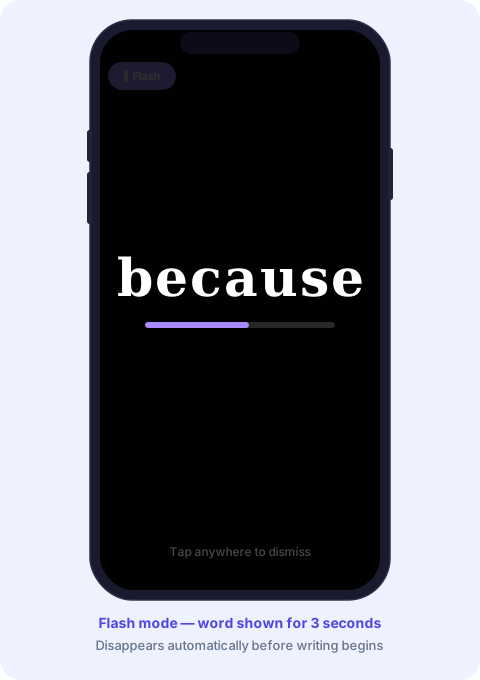
A purple countdown bar shows how much time is left. When it runs out, the overlay closes and the canvas is ready to write on. Parents can set the duration - 1, 2, 3, 5 or 8 seconds - from the settings panel for each child profile.
Flash brings the full look-cover-write-check sequence into a single, self-contained flow: tap Flash → read the word carefully → write it on the canvas → check the result. No flipping paper, no covering with a hand, no temptation to peek.
Who benefits most from handwriting mode
Young KS1 children - who are developing both spelling and handwriting simultaneously. The letter trace overlay provides a scaffold that can be removed as skills improve.
Kinaesthetic learners - children who learn better through physical movement. The motor memory component of writing reinforces spelling in a way typing doesn't reach.
Children with reading difficulties - who find the visual decoding of words challenging. Hearing the word first, then writing it, separates the spelling task from the reading task.
Children preparing for handwritten tests - most school spelling tests are still written by hand. Practising in the same modality as the test reduces the chance of knowing a word but struggling to produce it under test conditions.
Making it a daily habit
Five minutes of write spelling words practice each day - using the look-cover-write-check sequence - will produce more durable learning than a longer session once a week. The repetition needs to happen across several days for words to move from short-term to long-term memory.
A handwriting spelling app that makes this daily five-minute session quick to set up and easy to complete is one of the most practical tools a parent or teacher can have. The method is proven. The technology just needs to get out of the way and let it work.