
Here is the awkward truth about spelling apps: most of the spelling your child actually does never happens inside one. It happens on paper - the Friday test, the dictation in their book, the practice list scribbled on the back of a reading record. All that real effort, and the marks the teacher made, simply never reach the app you're using to help at home.
Spelling.Live now closes that gap. It's called Paper practice, and it does something no other spelling app in this category does: you photograph the marked paper sheet, and the app turns it into living progress data - including an assessment of the handwriting itself.
A real example
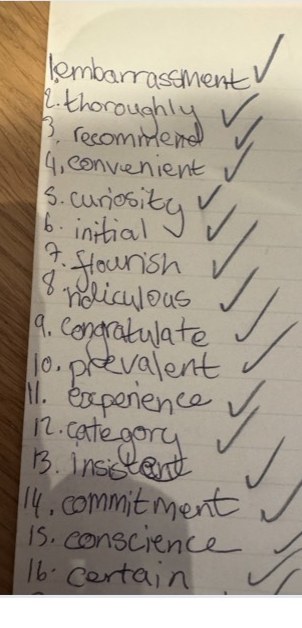
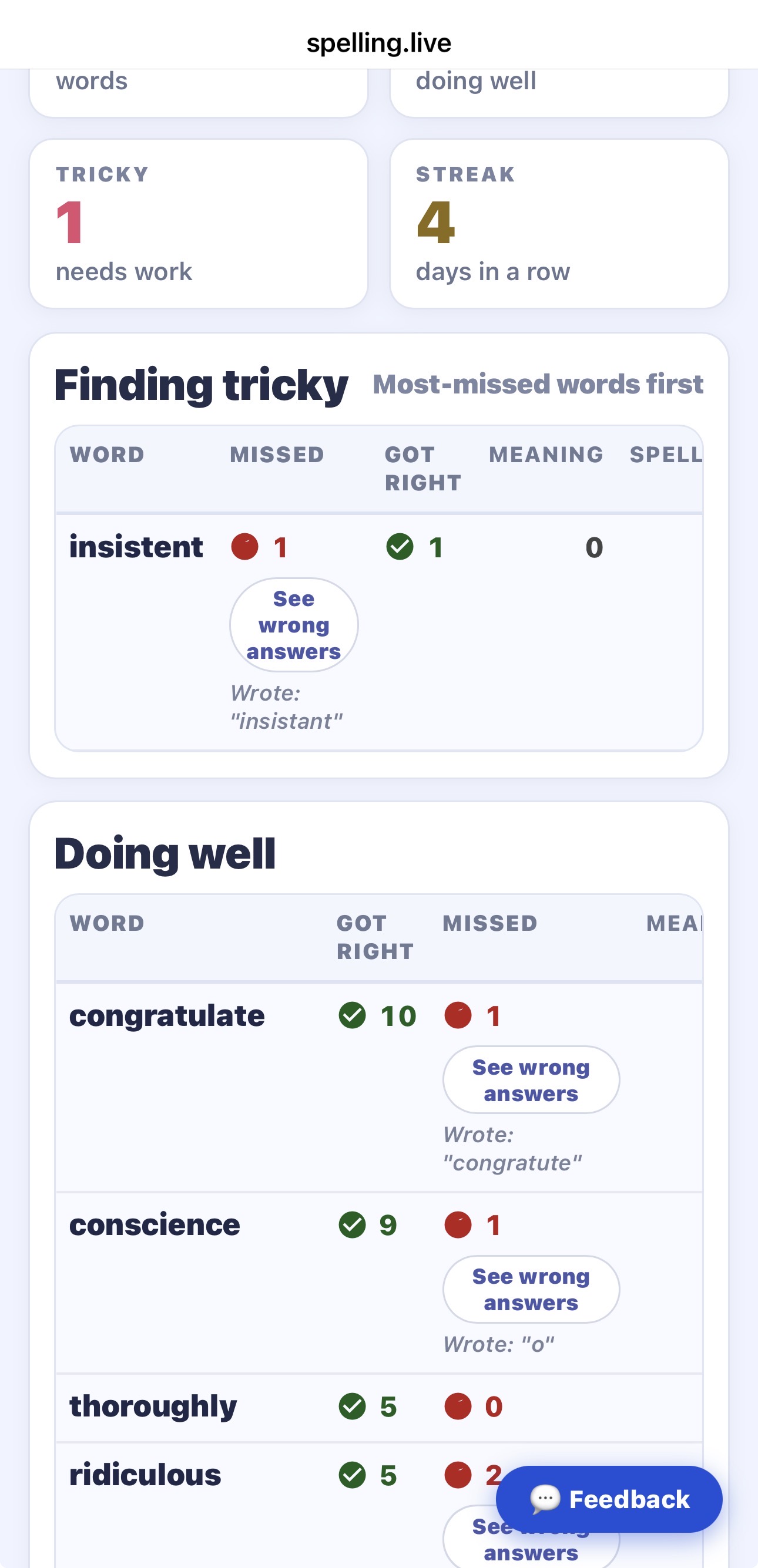
Here's exactly how it played out for one child's weekly test. Aarav photographed his sixteen-word spelling sheet, got fifteen right, and slipped on one - insistent, which he'd written as insistant. The app read the sheet, flagged that single miss, pushed it to the top of his "tricky words" list - and scored his handwriting from the very same photo.
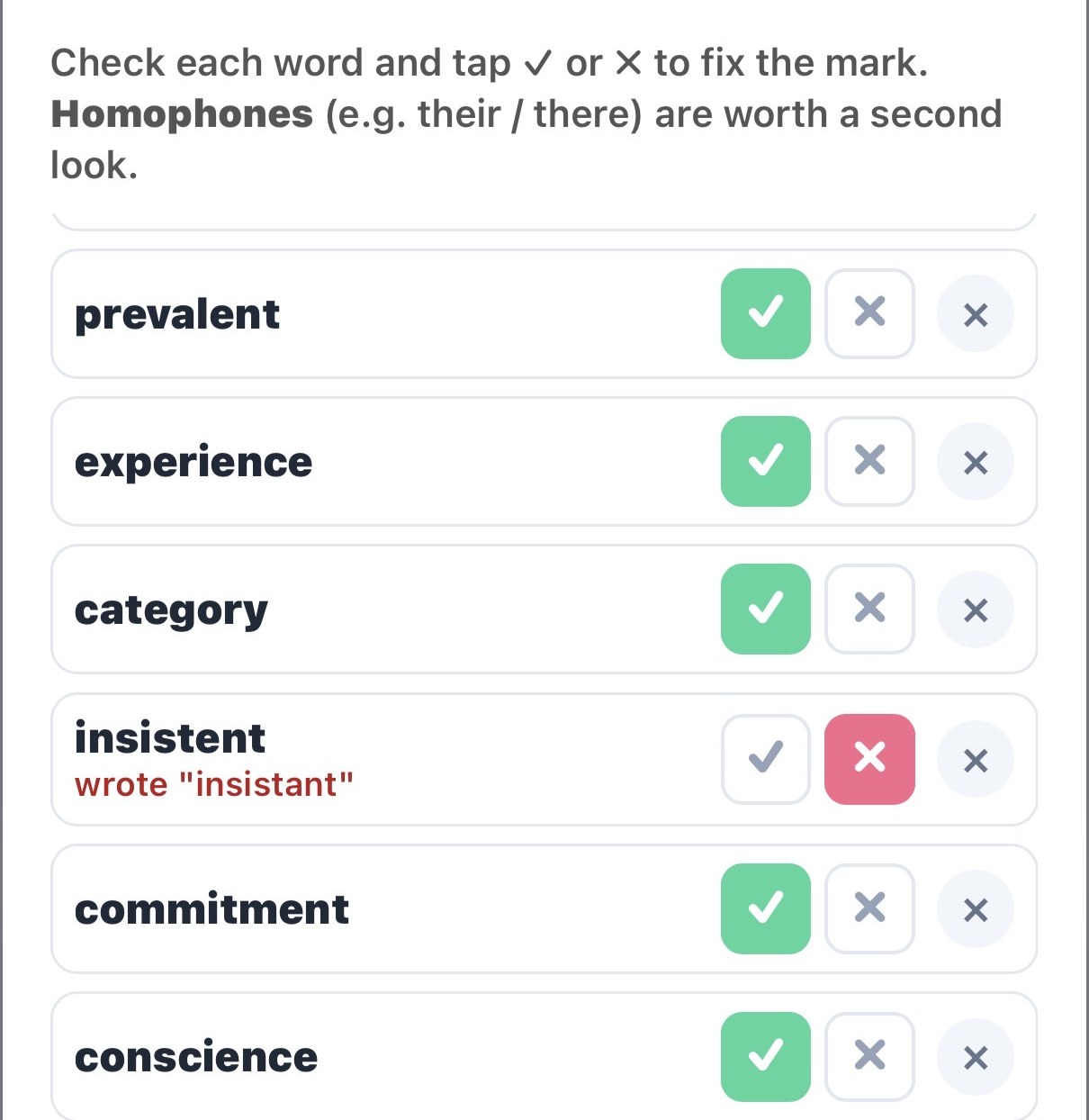
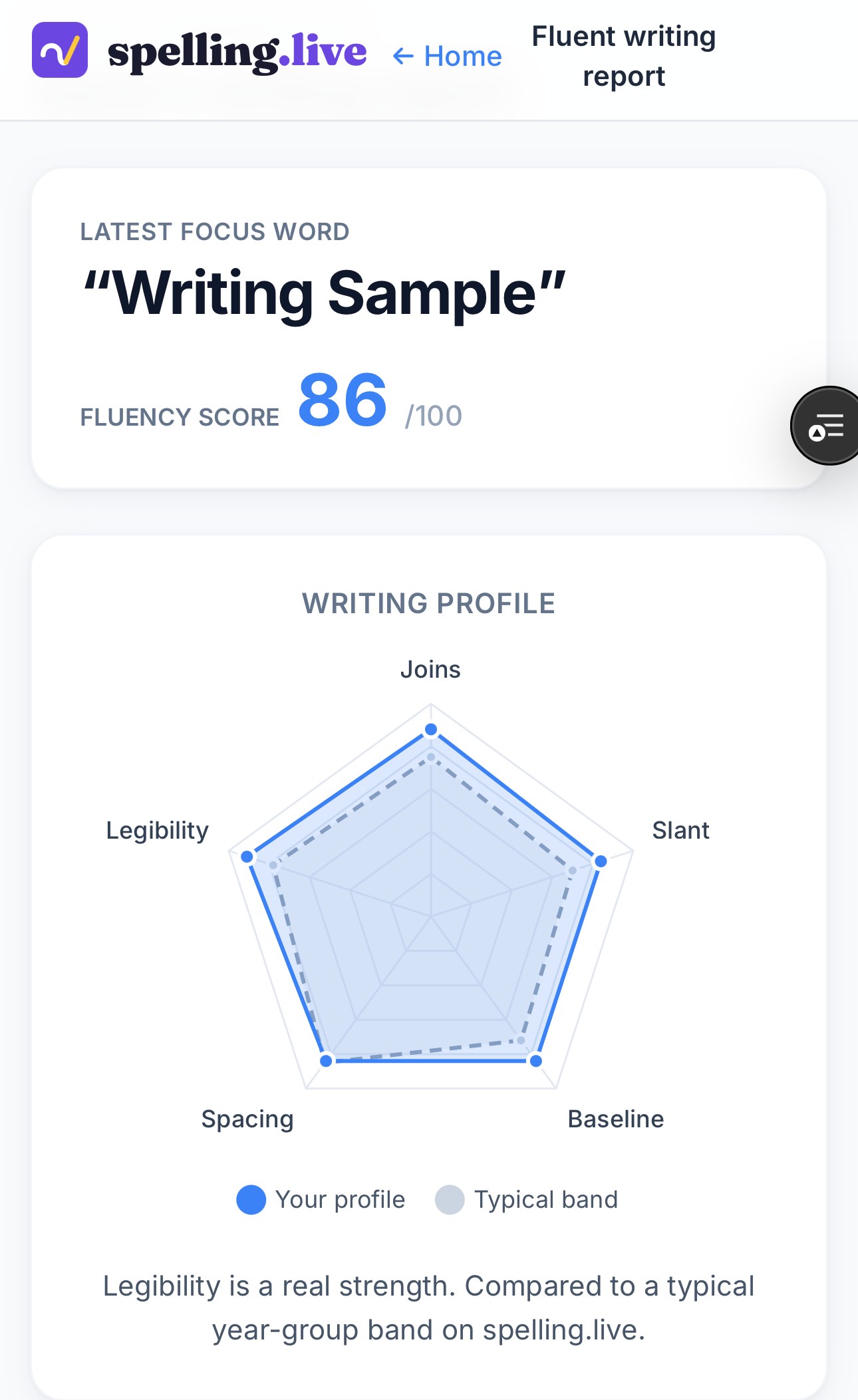
Those results flow straight into the reports. The missed word surfaces at the top of "Finding tricky" - and because handwriting analysis is switched on for Aarav, the writing on the page is scored too: a fluency of 86/100, with legibility picked out as a real strength.
How Paper practice works
Tap the Paper practice button on your child's card and take a photo of their spelling sheet - a marked weekly test, a dictation, or just a list of words they've written out. In a few seconds the app reads the whole page and does four things at once:
- Updates the progress report. Every word the sheet shows as right or wrong is recorded exactly as if it had been practised in the app - feeding the same progress screen and weekly parent reports.
- Captures the misspellings. For words marked wrong, it works out the intended word and remembers what your child actually wrote, so the "wrong answers" view and coaching tips stay accurate.
- Adds the words to practise. Any words not already in your child's lists are added automatically, so they can revise them in-app with audio, games, and handwriting mode.
- Scores the handwriting. If handwriting analysis is on for that child, the app assesses the writing on the page - letter formation for younger children, overall fluency (joins, slant, spacing, legibility) for older ones - and adds it to the Formation/Writing report.
Why this is genuinely different: most spelling apps live in a walled garden - they only know what happened on the screen. Paper practice brings the paper world, where the majority of school spelling actually takes place, into one joined-up picture of how your child is doing. And because it reads the writing on the page, it can assess handwriting from paper - something a screen-only app simply cannot do.
Built so parents barely have to lift a finger
We know the last thing a parent wants at 7pm is more admin. So Paper practice is built to do the checking for you:
- Correct spellings come pre-ticked. When a word on the sheet is clearly right, the app marks it correct for you. You only need to glance at the genuine discrepancies.
- Homophones get a gentle nudge. Where a word could be a "their / there" style trap, the app flags it for a second look rather than guessing.
- One photo, done. Reading the sheet, recording results, adding words, and scoring handwriting all happen from a single picture.
You stay in control - every mark is editable before you save - but on a clean sheet there's often nothing to change.
Why paper still matters (and why bridging it is the point)
Schools haven't gone paperless, and they shouldn't have to. The weekly spelling test, handwriting practice, and dictation are still overwhelmingly done with a pencil - and that's good for spelling and good for handwriting. The problem has only ever been that this effort was invisible to the tools families use at home.
By photographing the sheet, you get the best of both worlds: your child keeps writing by hand the way their teacher intends, and the results flow into a clear, longitudinal picture - which words are sticking, which keep tripping them up, and whether the handwriting is coming along. That's the bridge between paper and screen that makes the practice add up to something over a term, instead of vanishing every Friday.
What it costs
Paper practice uses the same credit system as the rest of Spelling.Live. A marked sheet of up to 15 words is 10 credits; if handwriting scoring runs as well, that's 2 more. There's no separate charge and no subscription tier to unlock it. (More on how credits work.)
Try it with this week's spelling test
Next time your child brings home a marked spelling sheet, don't file it in the bottom of the school bag. Photograph it. In under a minute you'll have their results in the progress report, the tricky words queued up to practise, and - if you like - a read on their handwriting too.
If you've been scanning the word list from a photo to set up practice, this is the other half of the loop: the list goes in by photo, and the results come back by photo. For more on what the app can tell you about letter formation, see our guide to handwriting analysis and progress reports for parents.