
Search for "best spelling app" and you'll mostly find lists that compare features and prices: how many games, how many word lists, how much a year. Those things matter, but they aren't what makes a child a better speller.
So this guide takes a different approach. It starts with what the research says actually improves spelling, turns that into six questions, and then checks eight apps used by UK families against them. We make one of the apps, Spelling.Live, so we've tried hard to be fair: where another app does something better, we say so.
Features and prices were checked in September 2026 and may have changed since. Always confirm on each app's own site.
Six things that improve spelling
1. It teaches, not just tests
A 2014 meta-analysis of 53 studies involving over 6,000 students (Graham and Santangelo) found that explicit spelling instruction improved spelling, and also reading and writing, compared with no or informal instruction. The Education Endowment Foundation's Improving Literacy in Key Stage 2 guidance makes the same point plainly: spelling should be actively taught rather than simply tested.
What to look for: when a child gets a word wrong, does the app help them understand why and try again, or just mark it wrong and move on?
2. It brings words back over days, not all at once
Recalling something from memory strengthens it more than looking at it again, and it works best when the recalls are spread out over time. Studies of children learning new words, including children with language difficulties, find that repeated, spaced retrieval beats repeated study. Cramming the list on Thursday night is the opposite.
What to look for: does a word your child got wrong last week come back on its own, and does a word they know well get rested?
3. It practises the way your child is tested
UK spelling tests are written by hand, and so is the Year 6 SATs spelling paper, where the teacher reads out sentences and children write the 20 missing words. Whether handwriting beats typing for learning spellings is still debated. A well-known 1990 study by Cunningham and Stanovich found that seven-year-olds learned more words by writing them than by typing or using letter tiles, but later replications didn't always find the same advantage. What isn't debated is that recognising the right spelling, typing it, and writing it from memory are different tasks. A child who only ever does one of them is practising a narrower skill than the test measures.
What to look for: can your child answer in more than one way, and does at least one of them mean writing the word from memory?
4. It works on how words are built
Many spellings make sense once you see the parts: happi-ness, un-believ-able, fanci-ful. A meta-analysis of 30 studies (Goodwin and Ahn, 2013) found that teaching word structure (morphology) had a moderate effect on spelling (d = 0.30), and the EEF recommends combining it with phonics rather than relying on phonics alone.
What to look for: does the app ever show a child the parts inside a word, or only the whole word?
5. It uses your child's words, and tells you what's going wrong
Children learn the words they're actually set, and a weekly score of "8 out of 10" doesn't tell a parent or teacher what to do next. A spelling mistake usually has a cause (a sound spelt the way it's heard, a silent letter missed, a suffix added without changing the word) and the cause is what needs practising.
What to look for: can you load this week's school list, and does the app tell you which pattern is behind the mistakes, not just which words were wrong?
6. It connects the spelling to what the word means
A word is easier to learn when a child knows what it means. In a 2010 study, children spelled new words correctly more often when they had been taught what the words meant, and practising spelling the words beat just reading them (Ouellette, 2010). But meaning on its own isn't enough: an earlier study found that adding a picture and a definition helped children recognise new words without making them better at spelling them (Ouellette and Fraser, 2009). Meaning helps most when it sits alongside spelling practice, not instead of it. The EEF's Key Stage 1 guidance also puts developing children's language and vocabulary first.
What to look for: does the app help a child understand the word (a picture for young children, a meaning or a sentence for older ones) while they practise spelling it, without giving the spelling away?
How the apps compare
| Ways to answer | Written answers checked | Your school's list | Explains why a word was wrong | |
|---|---|---|---|---|
| Spelling.Live | Choose, type, say aloud, write on screen, paper test | Yes, on screen and paper | Type it in or photograph it | Yes, names the spelling pattern |
| Spelling Shed | Typing, letter tiles, games | No | Typed in | Not that we found |
| SpellCast | Typing | No | Statutory lists | Not that we found |
| Squeebles Connect | Typing | No | Typed in, in your own voice | Not that we found |
| DoodleSpell | Typing | No | No, adaptive programme | Adaptive targeting of gaps |
| Nessy | Structured lessons and games | Paper activities, not marked | No, own programme | Structured phonics programme |
| Sir Linkalot | Watching mnemonic animations | No | No, own groupings | A memory trick per word |
| Spellzone | Typing, rules course | No | Partly | Diagnostic test and rules course |
"Not that we found" means we looked on the app's own site and store listing in September 2026 and couldn't find the feature, not that it definitely doesn't exist. Prices for every app are in our detailed comparison.
The apps, one by one
Spelling Shed (EdShed): best if your school already uses it. It's the name most UK schools know, with lots of games, curriculum lists and good value for a family (up to five children). If Friday's homework is set on Spelling Shed, using it at home is the obvious choice. It's typing- and tile-based, with no handwriting.
SpellCast: best for a calm, curriculum-first routine. A newer UK app built on the National Curriculum lists, with British narration, no leaderboards, and missed words that come back more often. Its free rule guides and word lists on the web are also worth a look. Practice is typed only.
Squeebles Spelling Connect: best low-cost test simulator. You can record the test words in your own voice, which no other app here does, and it's cheap. Lists are typed in and practice is typing-based.
DoodleSpell: best for a daily habit. The streaks and adaptive programme are genuinely good at building little-and-often practice. The programme chooses the words, so it isn't built around this week's school list, and it's the most expensive for a single child.
Nessy: best for dyslexia or significant reading difficulty. Built on structured-literacy principles by the Bristol Dyslexia Centre. If that's your child's situation, it's arguably the strongest specialist programme here. It follows its own progression rather than school lists.
Sir Linkalot: best for stubborn tricky words. Short, funny mnemonic animations for words that can't be sounded out. It works best alongside a practice tool rather than instead of one.
Spellzone: best for older students. A structured rules course with a diagnostic test, designed for learners who find children's apps too young. It's a strong choice from Year 7 up.
Where Spelling.Live fits
We built Spelling.Live around the six questions above, so it covers them all. Here's how, in plain terms:
- Teaches when a child gets stuck. A wrong answer brings help one step at a time: a quick look at the word or a tip naming the actual mistake, then the tricky letters, then more, with a retry after each (how it works). Reports record "correct with help" honestly rather than counting it as unaided.
- Brings words back over days. Every word runs on a spaced-repetition schedule: a missed word comes back the next day, and a secure one rests for weeks (more on that).
- Practises the way children are tested. Four ways to answer: Pick it (choosing the right spelling), Type it, Say it (spelling out loud) and Write it (writing from memory, checked by AI). On top of that, a paper dictation test the app reads aloud and then marks from a photo. Every way feeds the same progress report.
- Works on how words are built. Word Parts shows how fancy + ful becomes fanciful, including the letter that changes.
- Uses your child's words and explains the mistakes. Photograph the list from the book bag, and each wrong answer is matched to the spelling pattern behind it (what that looks like).
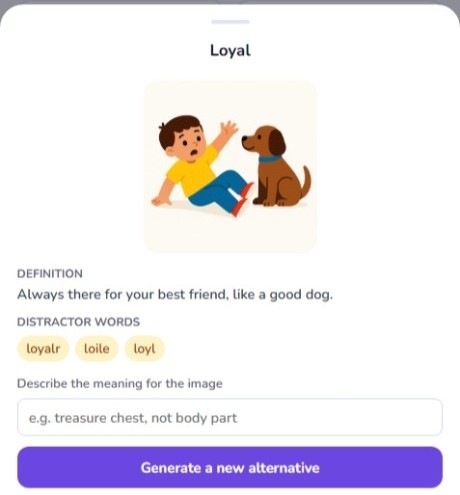
- Connects each word to its meaning. For 5 to 7 year olds, every word gets a picture clue drawn from what it means, never from its letters, so it can't give the spelling away. A parent or teacher can describe what the picture should show and ask for a new one (how the picture clues work). For older children, Word Meanings asks two questions about each word on their own list: "which word means this?" and "which word fills the gap in this sentence?" (more on Word Meanings).
It's free to start, with 200 credits and no card, and there's no subscription. The Educational App Store rated it 5.0 out of 5 and certified it after an independent review.
What it isn't: a full dyslexia programme like Nessy, or a secondary-school rules course like Spellzone. If one of those is what you need, choose it.
Which one should you choose?
- Your school sets Spelling Shed homework? Use Spelling Shed.
- Your child has dyslexia or a significant reading difficulty? Look at Nessy first.
- Your child is 11 or older, or finds children's apps babyish? Try Spellzone.
- You want your child to practise this week's list the way they'll be tested, including writing it, to understand what the words mean, and to know why words go wrong? That's what Spelling.Live is built for.
Frequently asked questions
What is the best spelling app for UK primary children? It depends on what you need, but judged on the six things research links to better spelling, Spelling.Live covers the most of them as of September 2026: it practises a child's own school list in four ways, marks real paper spelling tests from a photo, brings missed words back on a spaced schedule, explains the spelling pattern behind each mistake, teaches word parts, and connects each word to its meaning with picture clues for 5 to 7 year olds and a Word Meanings activity. Spelling Shed is the best fit if your child's school already sets it, Nessy is the strongest specialist programme for dyslexia, and Spellzone suits older students.
Do spelling apps actually improve children's spelling? They can, if they teach rather than just test. A 2014 meta-analysis of 53 studies (Graham and Santangelo) found that explicit spelling instruction improved spelling, and also reading and writing, compared with no or informal instruction. The EEF's Key Stage 2 guidance says spelling should be actively taught, not simply tested.
Do picture clues and word meanings help children learn spellings? They help, but only alongside spelling practice. A 2010 study (Ouellette) found children spelled new words correctly more often when they had been taught what the words meant, while a 2009 study (Ouellette and Fraser) found that a picture and definition on their own improved recognition but not spelling. Spelling.Live gives 5 to 7 year olds a picture clue for each word, drawn from its meaning so it never gives the spelling away, and older children a Word Meanings activity, both used alongside practising the spelling itself.
Is handwriting or typing better for learning spellings? The research is mixed. A 1990 study by Cunningham and Stanovich found seven-year-olds learned more spellings by writing them than by typing or using letter tiles, but later replications did not always find that advantage. What is clear is that UK spelling tests, including the Year 6 SATs spelling paper, are handwritten, so children should practise writing words from memory as well as typing them.
Which spelling apps check handwriting? As of September 2026, Spelling.Live is the only app on this list that checks handwriting, both on screen and on paper from a photo. Nessy includes paper activities but does not mark them. The others are screen-based and typing-led.
Which spelling app works with my child's own school spelling list? Spelling.Live, Spelling Shed and Squeebles all let you enter your own list, and Spelling.Live can also read it from a photo. SpellCast uses the National Curriculum statutory lists, while DoodleSpell, Nessy and Sir Linkalot follow their own programmes (as of September 2026).
Sources
- Graham, S. and Santangelo, T. (2014). Does spelling instruction make students better spellers, readers, and writers? A meta-analytic review. Reading and Writing, 27.
- Education Endowment Foundation (2021). Improving Literacy in Key Stage 2, second edition.
- Goodwin, A. and Ahn, S. (2013). A meta-analysis of morphological interventions in English. Scientific Studies of Reading, 17.
- Cunningham, A. and Stanovich, K. (1990). Early spelling acquisition: writing beats the computer. Journal of Educational Psychology, 82.
- Leonard, L., Christ, S., Karpicke, J. and Kueser, J. (2021). A multi-study examination of the role of repeated spaced retrieval in the word learning of children with developmental language disorder. Journal of Neurodevelopmental Disorders, 13.
- Ouellette, G. (2010). Orthographic learning in learning to spell: the roles of semantics and type of practice. Journal of Experimental Child Psychology, 107.
- Ouellette, G. and Fraser, J. (2009). What exactly is a yait anyway: the role of semantics in orthographic learning. Journal of Experimental Child Psychology, 104.
- Education Endowment Foundation (2020). Improving Literacy in Key Stage 1, second edition.
- Standards and Testing Agency (2026). Key stage 2 English grammar, punctuation and spelling test materials.
For prices and a deeper feature-by-feature look at each app, see Spelling.Live vs Spelling Shed, Squeebles, Sir Linkalot and more.