Your class still writes the test on paper. You stop marking it - and find out why they got it wrong.
Print a sheet per pupil, dictate the list exactly as you do now, then scan the pile through the photocopier once. Every page is matched to the right pupil and marked against the words you read out - then sorted into the spelling rules catching your class out, with each child's misses scheduled back into their own practice.
Free on teacher and tutor accounts. Marking is not charged while the class test is in beta.
What actually changes
Not the test. The test is the part worth keeping - real handwriting, real recall, under real test conditions. What goes is the evening afterwards, and the guesswork about what to teach next.
Friday, as it is now
- Read the list out from your own notes
- Collect thirty sheets
- Tick and cross every one by hand
- Copy the scores into a spreadsheet
- Try to spot a pattern across thirty papers
- Write next week's practice from memory
Friday, with bulk scan marking
- Read the list out from the printed script
- Scan the pile as one PDF
- No longer needed:
Tick and cross every one by hand -
No longer needed:
Copy the scores into a spreadsheet - Read the pattern off the class report
- Missed words are already scheduled back per child
How it runs
Four steps, and only one of them is new to you.
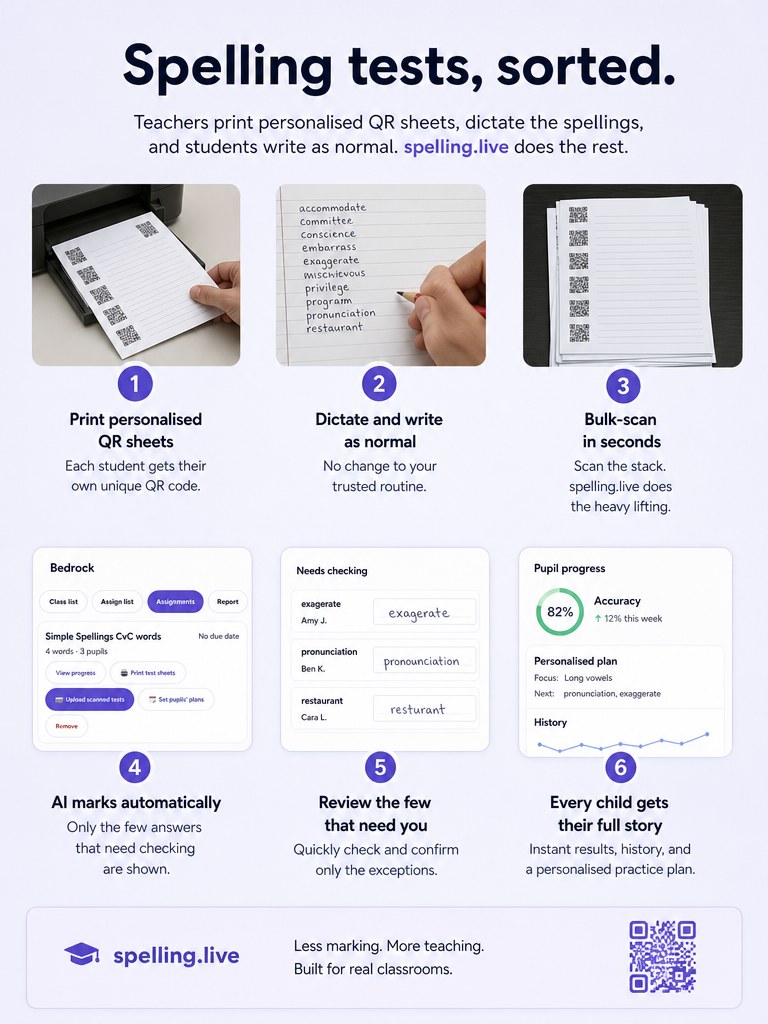
- Print the sheets. The first page is yours: the words in the order the pupils' lines are numbered, an example sentence to read for each, and homophones flagged so "wait or weight" is never ambiguous. Every page after it is one pupil's A4 sheet - their name already on it, numbered lines for up to 15 words, and a small QR code in the corner that says whose sheet it is and nothing else.
- Dictate and let them write. Exactly as you do now: you read, they write, by hand, on paper. No devices in the room, no per-pupil setup, no change to how the test feels.
- Scan the pile once. Straight through the photocopier as one PDF, in any order, and upload it in one go. Each page's QR code finds its pupil automatically; a page the scanner could not read gets a dropdown so you can place it in a couple of seconds. Photos work too if you would rather use a phone.
- Check what needs you - not everything. Every word is read and compared with the word you dictated. Correct answers fold away; anything marked wrong is shown next to what we read it as, and anything blank or unreadable is flagged on its own. Fix what needs fixing, then save the whole class in one tap.
What you get that a mark scheme cannot give you
Saving the evening is the obvious part. The part worth more is that "7 out of 10" becomes a diagnosis you can teach from on Monday.
⌨️ Nothing to type in anywhere
The moment you save, results land on each pupil's own record, in the class report and in that assignment's progress view. No score sheet, no spreadsheet, no re-keying.
🔍 The rule behind the mistake, class-wide
Every miss is sorted into the spelling pattern behind it - silent letters, doubled consonants, the unstressed vowel, y turning to i - and the class report rolls that up: which rule, how many pupils it is catching, and the words it landed on. "fanciful, merciful, pitiful" reads as one rule with one sentence, not three unrelated failures.
🔁 Each child's misses come back on their own
Spaced repetition schedules every word a pupil got wrong back into that pupil's own practice, at the point they are about to forget it. Thirty differentiated revision lists, none of which you wrote.
👀 "We misread it" is never "they got it wrong"
Correctness is never left to the model's opinion. It transcribes what is on the page, and the transcription is compared with the word you dictated.
Then every wrong answer is put in front of you with what we read it as, and blanks are flagged separately - so a misread letter cannot quietly become a spelling error on a child's record.
🏅 It counts as the strongest evidence we hold
Unaided written production on paper is the top tier of evidence in Spelling.Live - the bar a spelling rule has to clear to read as secure for a child. A typed practice answer with a hint showing cannot reach it. A class test can.
🤝 Parents see the same result
Where a pupil's family is linked to their profile, Friday's test shows up in what they see at home - with it clearly recorded as a class test, so nobody mistakes a graded test for a practice session.
What it costs
Marking is not charged at all while the class test is in beta. Teacher and tutor accounts get 500 AI credits a month, renewing - free for now, while we work out fair long-term pricing for groups - for everything else: practice, hints, coach tips, reports. Marking, when it is priced, will always be billed to your own allowance and never to a pupil's family. We will say so clearly here before either of those changes. Claim free tutor access if you have not already.
What it does not do
It is in beta, and we would rather you knew the edges before you tried it than found them in front of a class.
- 15 words a sheet. A longer list prints and is marked on its first 15, and the sheet tells you where to stop.
- It is not instant. Allow a couple of minutes of processing for a class set on top of the time it takes to scan. Minutes, not an evening - but not seconds, either.
- It is not unattended marking. You confirm the uncertain sheets. That is deliberate: it is what stops a misread word entering a child's record.
- It does not score handwriting - not yet. The app does analyse handwriting from a photograph of the page, and you can use that today on the per-child Dictation test and Paper practice routes. It is simply not wired into the class scan, which answers one question: was the spelling right. If you would want formation scored across a whole class set, tell us - that is exactly what the pilot is for.
- It does not write to your school MIS. Results populate Spelling.Live's own dashboards and reports; there is no sync to an external gradebook.
- It is a beta. Live in the app, past a private trial, now in a limited pilot. You may find rough edges, and the in-app feedback button comes straight to us.
We are taking a few more pilot partners
If you run spelling tests for a class or group - a school class, a tuition centre group, an after-school club - and you would try this for a few weeks and tell us honestly what worked, we would like to hear from you. You get early access at no extra cost, the raised 500-credit allowance, and a direct line to us: your feedback shapes what changes before this leaves beta.
Email us about the pilot →A line about your setting and roughly how many pupils you would be testing is plenty. You get a reply from a person, not an autoresponder. Or read the pilot announcement first.
Questions teachers ask
Does the test itself change?
No. You read the words out and the class writes them by hand on paper, which is how they will be tested at school. The only difference is the sheet they write on carries a QR code, and the marking happens from a scan instead of from a red pen.
How many words can be on a sheet?
Up to 15. A longer assignment prints and is marked on its first 15 words, and the printed sheet tells you where to stop.
How long does a class set take?
Roughly the time it takes to scan the pile, plus a couple of minutes of processing while the sheets are read - a class of thirty is a few minutes, not an evening. It is not instant, and we would rather say so than promise seconds.
What if the AI misreads a child's handwriting?
That is what the review screen is for. Correctness is never left to the model's own judgement: it transcribes what it sees, and the transcription is compared with the word you dictated. Every word marked wrong is shown alongside what we read it as, and anything blank or unreadable is flagged separately - so a misread letter never becomes a spelling mistake on a child's record without you seeing it first.
Where do the results go?
Into each pupil's own progress record, the class report and the assignment's progress view, the moment you save - there is nothing to type in anywhere. They are recorded as a class test, so it is always clear the words were dictated and written under test conditions rather than practised.
What does it cost?
Marking is not charged at all while the class test is in beta. Teacher and tutor accounts get 500 AI credits a month, renewing - free for now, while we work out fair long-term pricing for groups - for everything else, and marking, when it is priced, will always be billed to your own allowance and never to a pupil's family - see how credits work. We will say so clearly here before either of those changes.
Does it score handwriting as well?
Not in this flow, though the app can do it. Handwriting is analysed from a photograph of the page on the per-child Dictation test and Paper practice routes, and that works today. It is deliberately not wired into the class scan, which answers one question: was the spelling right. Scoring formation across thirty sheets at once is a bigger call - it is a second credit per sheet, and not every class wants it - so we would rather add it because pilot schools asked for it than switch it on by assumption. If you want it, tell us.
Do my pupils need email addresses or devices?
Not for this. Bulk-add your roster and Spelling.Live generates a username and password per pupil, with printable QR login labels for younger ones - but the class test itself is paper only, so a pupil needs no device and no login to sit it. They only need one to practise between tests.
Is it safe for children's data?
It is built as a children's product first. The QR code on a sheet encodes only which sheet it is - never a name, never credentials - so a sheet left on a desk reveals nothing by itself. Beyond that: no ads, children identified by profile ID rather than name in analytics, self-service export and deletion, and a published AI transparency register naming every AI vendor and what is sent to them. Full detail in our privacy notice.
Is it finished?
It is live in the app and clearly marked Beta. It has been through a small private trial and is now in a limited pilot with schools and tuition centres, because different photocopiers, handwriting styles and class sizes teach us more than more guessing on our end would. We are taking a few more pilot partners.