Create a class
Name it (e.g. Year 3 Blue) and you're done. Run as many classes as you like - a tutor might have an early group and a fluent group - and rename one any time with the ✏️ next to its name.

Run whole classes on Spelling.Live: create pupil logins in bulk, hand out printed login labels, assign spelling lists with due dates and notes, use Bulk scan marking to test the whole class on paper with QR-coded sheets and one-batch AI marking, and see class-level progress - without setting up each child by hand.
Name it (e.g. Year 3 Blue) and you're done. Run as many classes as you like - a tutor might have an early group and a fluent group - and rename one any time with the ✏️ next to its name.
Paste one pupil name per line (add a parent's email after a comma to invite them too). The app creates a profile and a child login for each - use your own username prefix so logins stay unique to your class.
Use Google Classroom? On Bulk add pupils, choose Import from Google Classroom, sign in to the Google account that teaches the class, pick the class and tick the pupils. We read only your class list and each pupil's name - no email addresses or photos - and pupils keep their Spelling.Live logins (they never sign in with Google). Importing the same class again recognises pupils you have already imported rather than creating them twice; a pupil with the same name as one already in your class is flagged so you can decide. Your school's Google admin may need to allow Spelling.Live first (Admin console → Security → API controls → App access control) - or install it for the whole school from our Google Workspace Marketplace listing.
After a bulk add you get ready-to-print labels - name, username, password and simple sign-in steps - to cut out and stick in planners. Each label also carries a QR code a grown-up can scan to sign the child straight in, or pupils sign in at Spelling.Live → Sign in → Child tab.
Children already on your account can be added to a class from a tick-list - useful when you've been working 1-to-1 and want to move to class-level assignment and reporting.
If a pupil already practises at home, they can join your class with all their history - the same profile, so every past practice, report and streak comes with them. Nothing is copied or re-created, and the parent keeps their access at home.
What you can do for a shared pupil. If the parent invited you as a Tutor, you can see, print and reset the pupil's login (under More on their row), tick them for login labels and the class week, and change their learning plan. The parent still owns the account and pays for it. A pupil shared with you as a second parent keeps their login with the parent.
Yes, if the parent invited you as a Tutor (tutors can edit). You can then see, print and reset that pupil's login, and change their learning plan, from your class roster. The parent still owns the account and pays for it. If the parent invited you as a second parent, the login stays with the parent and the tick box beside the pupil is greyed out.
Open the class and choose Assign list. Tick any of your existing lists - each shows its words, and each ticked list gets its own due date and note (e.g. "focus on the endings") - or create a new list right there: type or paste the words, snap a photo of a paper list, generate one from a topic with AI, or pick a UK curriculum preset. Send to the whole class or just the pupils you tick - ideal for ability groups.
Under the words, Weekly plan asks what the list does to each pupil's week. Start this week (the default) makes it this week's practice, and Queue for a later week lines it up to start on its own later - see Plan a half term in one sitting below.
Each pupil's home card shows an Assigned spellings panel with the list, your note, the due date, and a Practise button that starts that exact list. A week after its due date an assignment drops off the panel - the list itself stays in the pupil's list picker.
Assigning a list to 30 pupils runs the word checks, audio and picture generation once for the class - it doesn't multiply your AI credit usage per child.
For Years 3 to 6 there is a ready-made weekly scheme built from English Appendix 1: one rule or set of statutory words a week, with a revision week every half term. On a class's Assign list tab, choose Use a scheme, pick the term, change any week, and send it. Week 1 starts and the rest are queued. See the weekly scheme for the full steps.
Most schools hand out a new spelling list every week. You do not have to come back every Monday to give it out: assign all six (or seven) lists in one go and let the app move each pupil on to the next list when their week ends. Nothing to remember, and every pupil moves on at the right moment for them.
A queue moves when a pupil's current week ends, usually on a Monday. The next list in that pupil's queue becomes their week's practice, with the same rhythm and activities as before. A pupil who is away keeps their place: their queue waits until they come back to the app.
Lists are queued in the order you assign them. If one group has its own lists, tick just those pupils when you assign and queue - the card tells you when the order differs by pupil. Load a whole half term for the class and a separate run for an intervention group in the same sitting.
Every assignment card has a Print practice packs button. It prints one screen-free practice pack for every pupil on the list in a single run: look, cover, write, check for the words that pupil most needs, plus a crossword or word search built from the list. Each pack is personalised, because a pupil's revision words come from their own practice, not just the list.
A tick list appears before printing. Untick a pupil who is away, or who does not want paper work, and the run prints packs for everyone else. The pupil's name is printed on their pack so handing them out is quick.
Class packs are practice pages only. The Friday test for a class is the paper class test, printed and marked in one scan; a parent's own pack at home carries the test page too, and is marked from the child's card. See the printed practice pack page for what is on each page.
Once a list is assigned, its assignment card grows two buttons - 🖨 Print test sheets and 📷 Upload scanned tests - for testing the whole class on paper and marking every sheet in one batch, no per-pupil photos needed. (A third button, Print practice packs, is for practice rather than testing - see above.)
This is new and still in a small pilot with a handful of schools and tuition centres, so you may spot rough edges - if you do, the feedback button in the app comes straight to us. We're actively looking for a few more schools or tuition centres to trial it before a wider release; read the announcement if you'd like to be one of them.
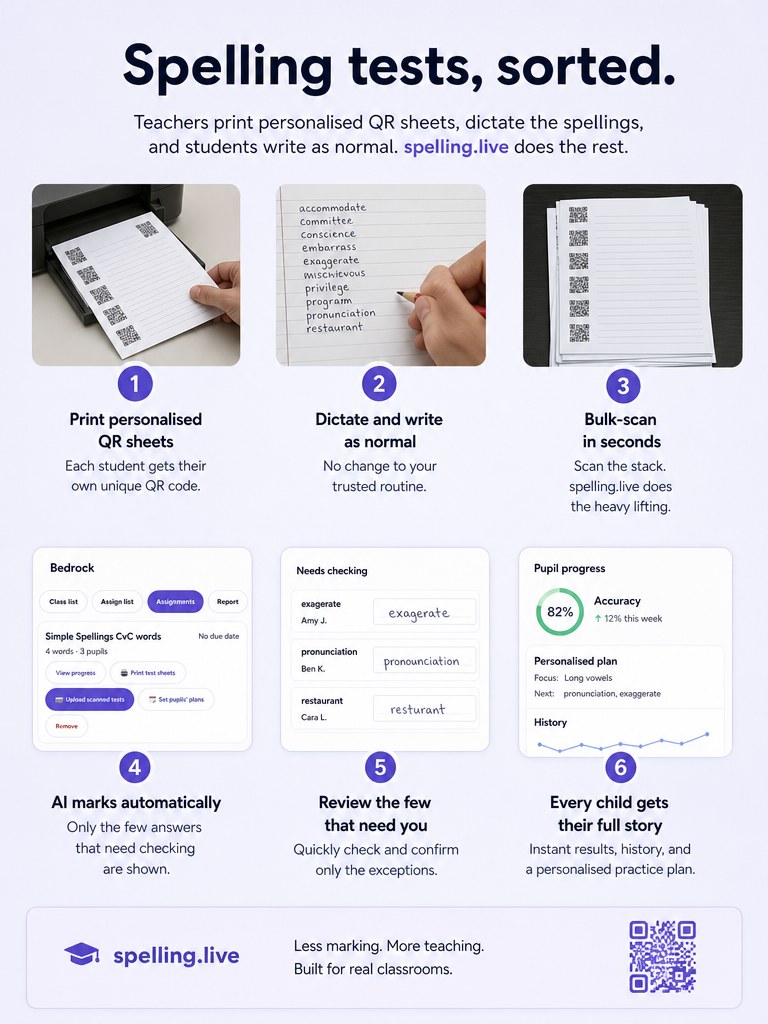
Marking is not charged while the class test is in beta, though the screen still shows your balance and labels the Mark button with the cost it will carry once it is priced (e.g. "Mark 28 sheets - uses 28 credits"). When it is priced it will come out of your own teacher allowance, never a pupil's family account.
Results are saved to each pupil's progress report and feed spaced repetition, same as any other real test - but tagged as bulk scan marking, so it's always clear the words were dictated and marked in the classroom rather than at home.
In a pupil's weekly plan, a test slot can be set to Paper in class, or on screen if not scanned. A scan then fills that test, and the list decides which one it is: a scan of last week's list counts as the hot test, and a scan of this week's list as the cold test. A pupil with no scanned sheet takes the test on screen as normal. If you use the same list in both weeks, the first scan of the week counts as the hot test and the second as the cold test.
A test sheet covers up to 15 words. Assign a longer list and you'll see a warning that only the first 15 are printed and tested - the rest still live in the list for regular practice.
This is different from a pupil's own Dictation test or Paper practice - both of those are run by a parent, one child at a time. Bulk scan marking is yours to run for the whole group in one sitting: you print every pupil's sheet at once, and one upload marks the entire pile.
See every list you've set, who it went to, and how many of its words each pupil has mastered since it was assigned. Once a due date passes, pupils who haven't finished are flagged Behind - so a glance shows who missed the deadline.
Class accuracy, active pupils and the words the class finds trickiest, with a sortable per-pupil table. Game plays never count towards accuracy - only real practice and dictation do. With class weeks on, it starts with a cold to hot card for each list (see below).
Friendly competition between your own classes: correct spellings over the last 30 days, ranked. Only you see it - perfect for a bit of end-of-week motivation.
Teacher and tutor accounts get a raised allowance of 500 AI credits a month, renewing - free for now, while we work out fair long-term pricing for groups. (A family instead starts with a one-off 200 and tops up when it needs more.) To switch it on, choose Teacher / tutor under Manage → Your role & name and answer the two short questions about your group - it's applied straight away, free. Not signed up yet? Claim it from the tutor access page instead. The credit meter on your dashboard always shows where you stand.
Build one week the way your class works, save it, and give it to every pupil in a few taps. You need the class week tools switched on for your account.
Pupils a parent or guardian changed start unticked, with the reason beside their name. If you tick them anyway, you are asked first, and the question names whose change you are replacing. A pupil a parent shared with you starts unticked too, because their parent set their week. Groups of pupils inside a class are coming later.
Their week is different from the class week. A parent or guardian may have changed it, they may be on their own week, or they may be on another week. The reason is shown beside their name. You can still tick them, and you will be asked before their week is replaced.
No. Each pupil keeps the word list their week is anchored to. Applying a class week only changes the activities on each day.
You can name any activity in a week. Cold test and Hot test are quick names for tests: no hints and one try. Open the cog on the activity to pick one. See the learning plan for the steps.
The Report tab shows one card for each list your class was tested on in the last 8 weeks. The card shows the cold test score (before practice) and the hot test score (after practice), how many pupils improved, stayed the same, went down or missed the hot test, how many had no cold test, the three words still most often wrong, and each pupil's two scores side by side. A list with only a cold test so far says when the hot test is, from the day the Hot test sits on in your week (or "Hot test next week" if the week has no test day). A scanned class test counts as the cold or hot test, and if a pupil has both a scan and an on-screen test, the scan is used. Only tests named exactly Cold test or Hot test are shown.
The card only shows tests named Cold test or Hot test in the last 8 weeks. A test you gave your own name is not shown, and a list nobody has been tested on yet has no card.