Words mastered
Correct consistently across multiple sessions.
The app tracks two related things: spelling progress (whether each word is known) and, when handwriting analysis is on for your child, writing progress (how letters and joins are forming over time).
This is what you see around word lists, tests, and difficult-word flags - it is separate from handwriting formation scoring.
This builds a picture over time of each word's difficulty for your child specifically - not just a general difficulty rating.
After any session, you can mark specific words as difficult. These words are flagged in the list and brought back at the start of the next session, before other words.
Mark difficult words immediately after a home test or school test while the result is fresh.
Every practice session and the Dictation test automatically bring a child's hardest and most overdue words to the front of the list, using how they've actually done on each word before - not a general difficulty rating. A word gone wrong or newly relapsed comes back roughly every 3 weeks until it sticks. This runs in the background; there's nothing to switch on.
On the Add spellings screen, tap 🧠 Suggest from progress to build a new list from your child's own history: their overdue/hardest words, plus AI-generated new words that target their most common misspelling pattern - each one shown with the reason it was picked. Deselect any you don't want, then save. Free unless new words need generating, which costs 1 credit.
Correct consistently across multiple sessions.
Getting better - keep practising.
Still incorrect or inconsistent - bring these back next session.
Use the report to decide whether to move on to new words or continue drilling the current list.
If you opt in, Spelling.Live emails you a summary of your child's practice every week or month - written in plain English, delivered to your inbox, with no need to log in.
Not all spelling practice is equally challenging. The mode breakdown tells you a lot about how your child is working:
Your child selects the correct spelling from four options. Builds recognition - the lowest cognitive load of the three modes.
Your child says the word aloud and the app checks the spelling. Recall from memory - harder than picking from a list.
Your child writes the word by hand; AI vision checks letter formation in real time. The closest to a real spelling test.
A child who scores 95% on Pick It but 60% on Write It is recognising words they can't yet produce from memory - exactly the gap that matters on a Friday morning spelling test. Seeing the mode breakdown helps you spot this and nudge them towards more writing practice.
At the top of each report is a short paragraph written fresh by the same AI that powers the spelling coach. It reads the stats for that period, notices what changed, and writes a warm, specific summary. A strong week sounds different from a quiet one - tricky words get woven in naturally, and the tone adjusts to what actually happened rather than using a fixed template.
Covers the past seven days. Best if you want a regular check-in and like staying close to what your child is working on.
Covers the past four weeks. Useful if you prefer a less frequent overview - for example, to review how a whole school term is going.
You can switch frequency or unsubscribe at any time. Every report email has an unsubscribe link in the footer.
In the same Progress reports section of your account settings, you can add extra addresses to receive reports - a co-parent, a class teacher, or anyone else who should stay in the loop. Since each child's report is its own email, you can choose whether a recipient gets every child's report or just one child's - useful if, say, a teacher only teaches one of your children. Each person you add can unsubscribe themselves at any time without affecting you or anyone else on the list.
If you signed in with Sign in with Apple and chose to hide your email, your account email is a private Apple relay address rather than your real inbox - you'll see a prompt in this section to add your real address as an extra recipient, so your reports keep reaching you even if Apple's forwarding is ever turned off.
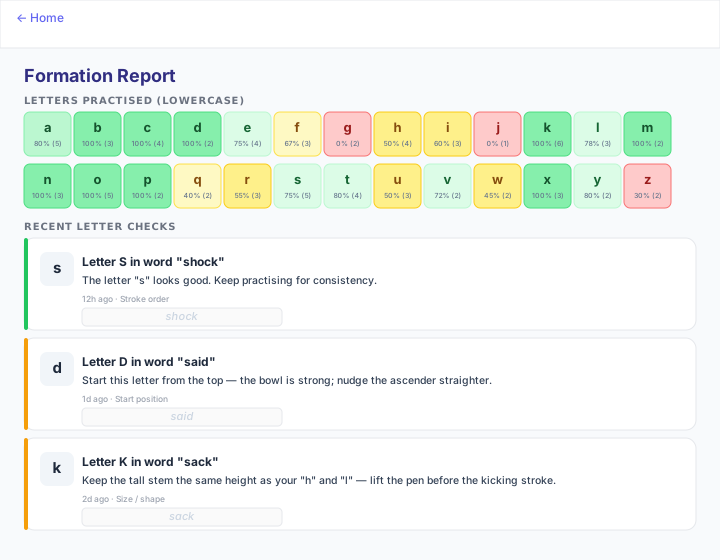
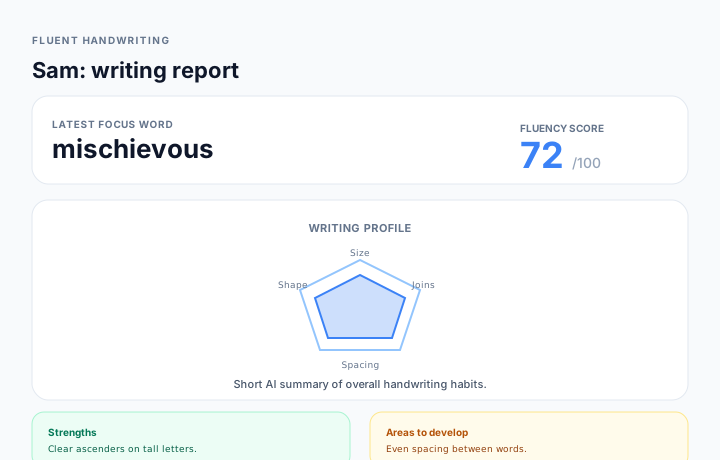
When letter formation analysis is enabled for your child and they write in Handwrite it mode (with cloud sync), each attempt can be assessed for how the letters were formed, not only whether the spelling was right. That data feeds two parent-facing reports, depending on age band.
Many Early profiles (Year 1–2) have this on by default; Fluent profiles often start with it off - the setting on your child's profile controls how much formation feedback is saved for the reports below.
Opens from the child's home or profile menu as Formation Report (/formation-report). You get:
Opens as Writing Report (/fluent-writing-report). It is tuned for older writers and includes:
The app tracks daily practice streaks. Consistent short sessions build stronger retention than occasional long ones - the streak indicator is a useful nudge for children who respond to visual progress cues.