
Drafted with AI assistance and reviewed, fact-checked and edited by hand before publishing - see our AI transparency page for how we use AI across the app.
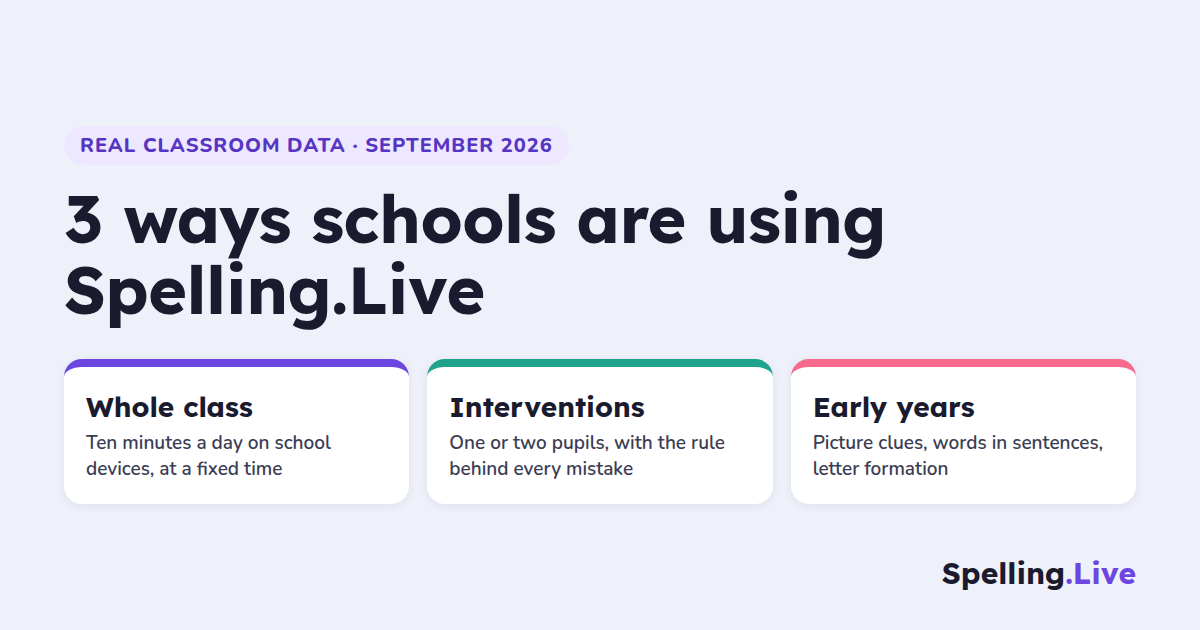
Most of what we write here is about families practising at home. But this term something different started happening: teachers began using Spelling.Live in school, with their classes, in lesson time. Three patterns have emerged, and they look quite different from each other. This post walks through each one with the real usage numbers behind it, and ends with an offer: if you teach a class, we would like you to pilot it with us.
The schools and teachers are not named here. The numbers are real, taken from the app's own records up to 24 September 2026.
1. Whole-class sessions on school devices
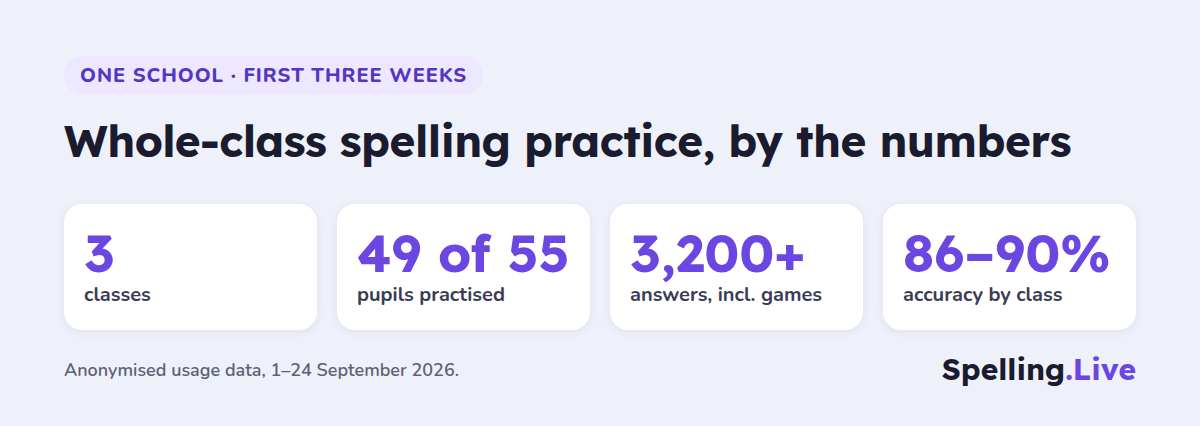
The clearest example is a primary school that set up three classes, around 55 pupils, at the start of September. In the first three weeks:
- 49 pupils practised
- they answered over 3,200 spelling questions between them (including spelling games)
- accuracy sat at 86-90% across the three classes - high enough that children feel successful, low enough that there is still something to learn
What stands out is the cadence. Each class has its own fixed slot in the school day - one first thing in the morning, one mid-morning, one just after lunch - and practises in that slot most school days. One class has practised on every school day since it started. There is no evening peak and no weekend spike: this is a class routine, not homework.
Why teachers say it works in a classroom
It is easy to run. A teacher adds pupils once (paste a list of names, or import the class from Google Classroom), prints login labels, and assigns the week's list. After that, a session is "tablets out, sign in, practise". Pupils can type their login or scan the QR code on their label.
Every child is on their own words at their own pace. The whole class works from the same list, but each child meets their own tricky words more often. Words they get wrong come back later through spaced repetition; words they already know drop back.
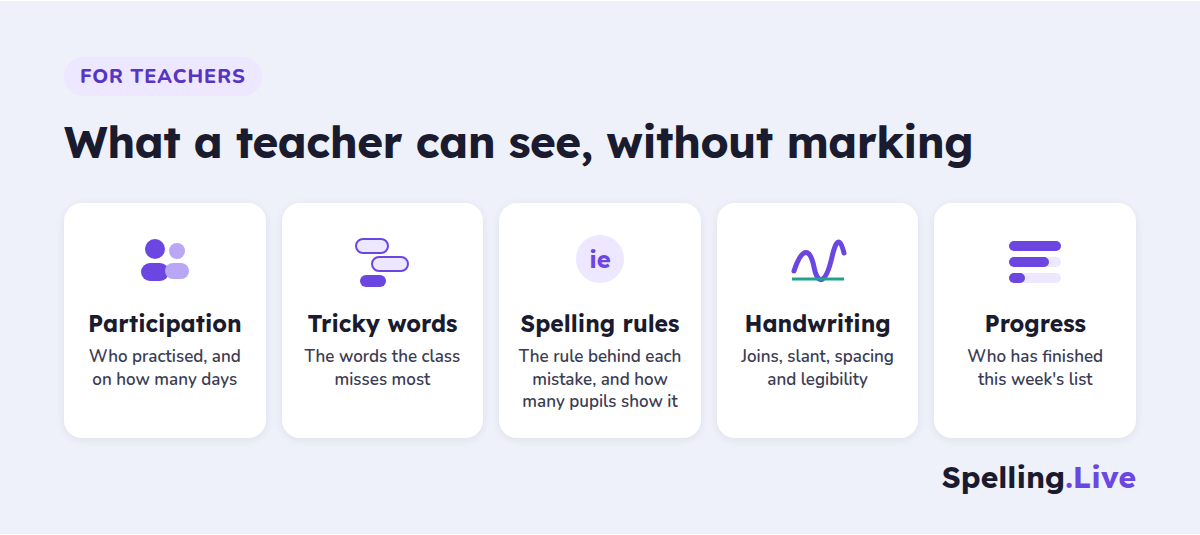
The results are already there. Nothing to collect or mark. The class dashboard shows who has practised, which words are catching the class out, and which spelling patterns are behind the mistakes - so Friday's input can target the rule the class is actually struggling with, not a guess.
The mix of activities keeps it fresh. The three classes use a mix of Pick it (choose the right spelling), Type it and Write it (handwriting on screen). A class can start the week recognising the words and finish it producing them from memory.
What the first month showed
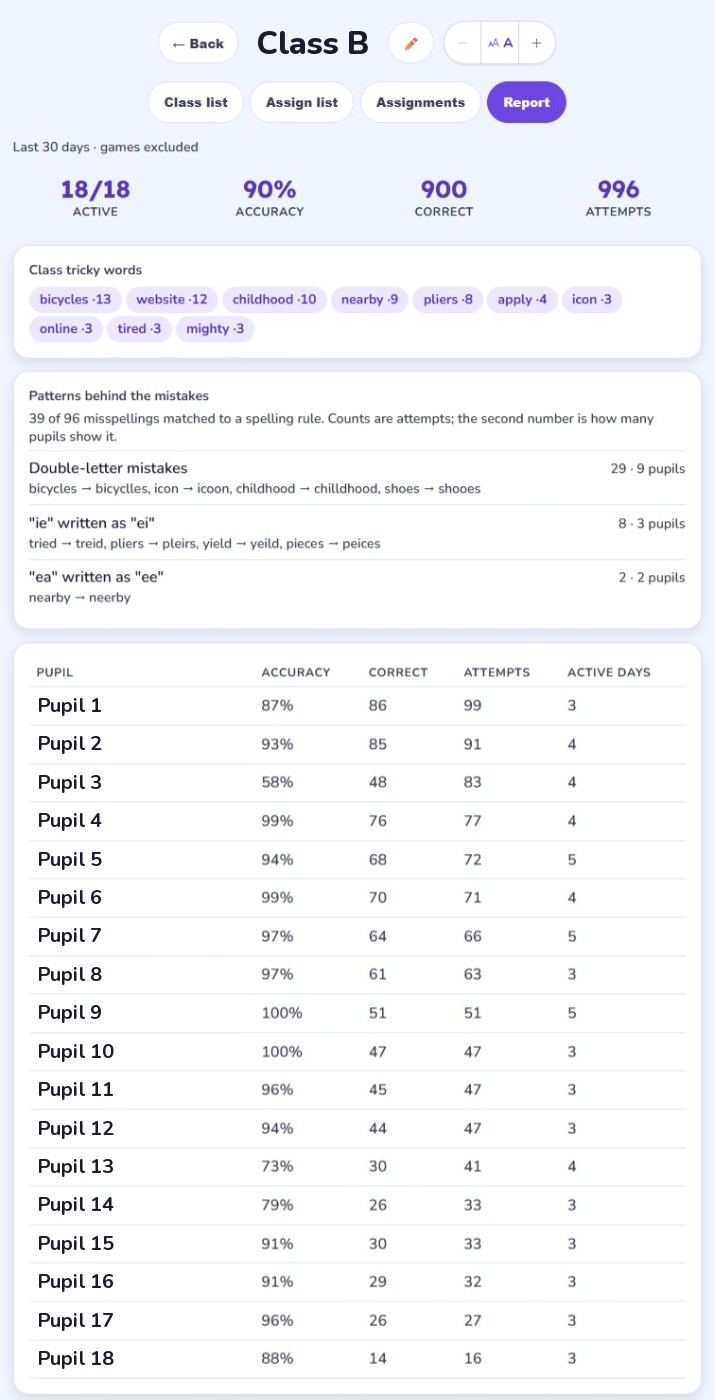
This is one of the classes' reports, with the pupil and class names replaced. Every one of its 18 pupils practised: 996 attempts at 90% accuracy. Three things stand out across the classes.
The same two spelling rules came top in two different classes. Double-letter mistakes (bicyclles, vallley) and "ie" written as "ei" (yeild, peices) led both reports. In one class, 111 of 132 misspellings matched a named rule, and "ie"/"ei" alone showed up in 7 pupils. So one short lesson covers four of that class's ten tricky words.
The teacher can see who has done the week's list. With the due date still days away, 8 of 18 pupils had finished a 20-word list and most of the rest were within three words.
Right first time and right with help are counted separately. In Type it, about 6 in 10 answers were right first time. About 3 in 10 more were right once help appeared, such as the word flashed on screen or its key letters shown. So a teacher can tell a word the class has secured from one they can only get with support.
The full walkthrough is in two classes, 1,875 spelling attempts: what the data showed. It covers both class reports, the assignment view, a pupil's report and a handwriting report.
If you would rather keep the test itself on paper, the paper class test lets you dictate as normal, scan the pile and have the marking done for you.
2. Interventions for one or two children
The second pattern is smaller and more targeted. A teacher sets up a "class" of one or two pupils who need extra support with spelling, and runs short, frequent sessions.
One teacher working this way with a single pupil ran six sessions in ten days, around 100 answers in all, with an accuracy close to 90%. Another tutor has worked with a small group of children across 79 different days since May - the longest-running intervention on the platform.
What makes it useful for intervention work:
- You see why a word is wrong, not just that it is. Each mistake is sorted into sound, look, structure or rule errors (how the diagnosis works), so you can tell a child who is guessing from sound apart from one who has not learned a suffix rule.
- Help arrives one step at a time. When a child is stuck, the app shows a little more help on each try rather than the answer straight away, so the child still does the work.
- It carries on between sessions. An intervention slot might be twice a week. The practice plan and the missed words keep going on the days in between, at school or at home.
- Support settings are per child. Reading fonts, text size, colour overlays, a more forgiving handwriting reader and gentler feedback can all be set for the one child who needs them without changing anything for the rest of the class.
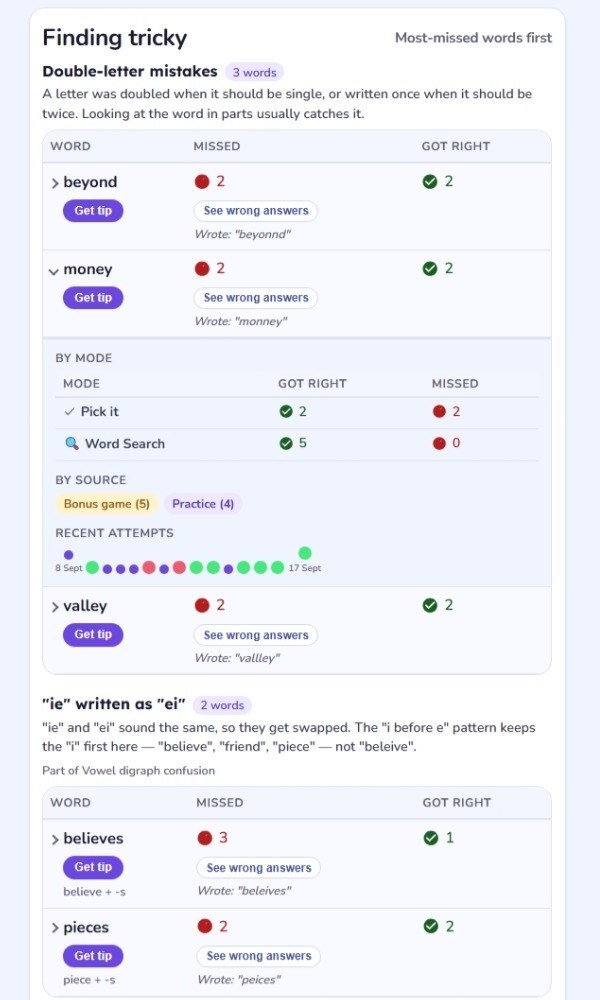
This is what a teacher sees for one pupil (from a class, with the name removed). Six tricky words sit under two rules, and each shows what the child actually wrote: beyonnd, monney, vallley, beleives, peices. An intervention session can go straight to those two rules.
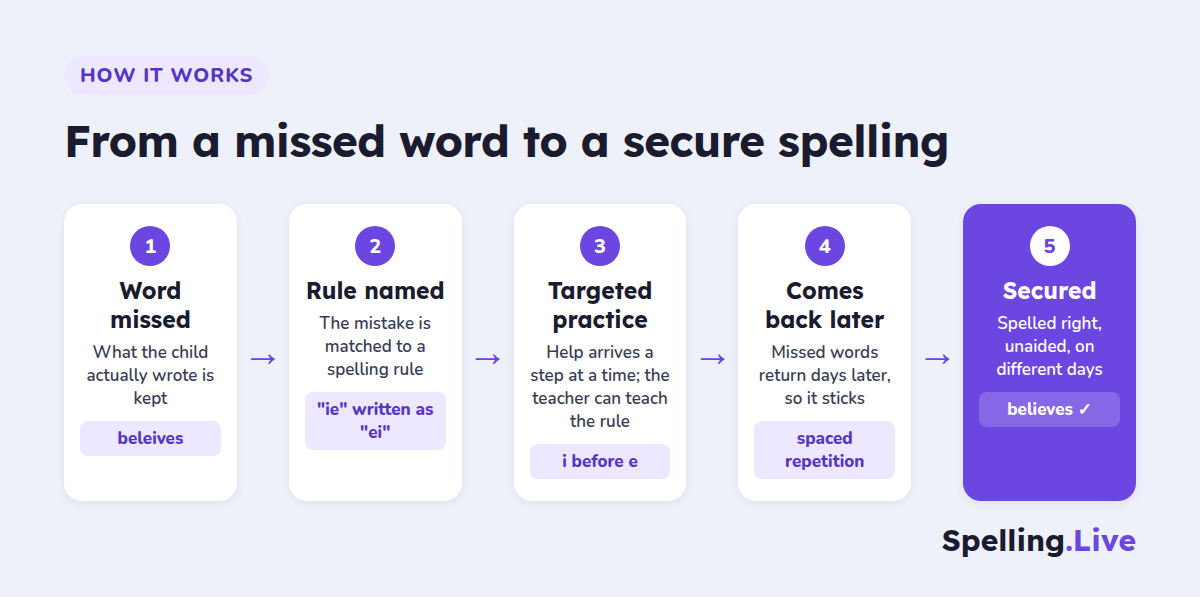
That is the loop the app runs for every child: word missed, rule named, targeted practice, the word comes back days later - and keeps coming back until the child spells it right, without help, on different days.
3. Early years: pictures, sentences and letter formation
The third pattern came from one teacher who has taken the early years tools further than anyone else. Working with a small group that includes Reception and Year 1 children, they have:
- created over 180 picture clues for their words, describing what each picture should show so it matches the sentence they use in class, and regenerating it when it does not
- had the app check almost 590 handwritten attempts for letter formation
- mixed on-screen practice with paper: photographing worksheets with Paper practice and running dictation tests
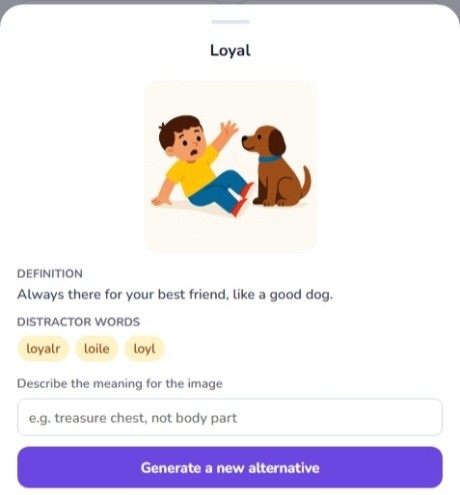
In the example above, the word is loyal. Its child-friendly definition reads "Always there for your best friend, like a good dog", the picture shows a boy with his dog, and the box underneath is where a teacher types what the picture should show before generating a new one. The app also lists near-miss spellings (loyalr, loile, loyl) to use as wrong options in Pick it.
The pairing is the point. A young child who is still learning to read the word gets three routes into it at once: the picture, the word read aloud in a sentence, and the physical act of writing it, with feedback on how the letters were formed. For more on the picture side, see AI picture hints for early spellers; for handwriting, cursive tracing and real handwriting recognition.
What all three have in common
- Short and regular. Ten to fifteen minutes, several times a week, at a set time. This matches what the research on spacing says and what teachers told us is realistic.
- The teacher sets the words. Built-in National Curriculum lists (Year 1 and Year 2 common exception words, Year 3/4 and Year 5/6 statutory spellings) or the school's own weekly list, typed, pasted or photographed.
- No marking. Every answer is recorded, diagnosed and reported automatically.
Pilot it with one class this term
We are looking for a small number of schools to pilot Spelling.Live with one class - a whole class, a year group intervention, or a Reception group. One class is enough.
What you get:
- Free teacher access with 500 AI credits a month, enough for regular class practice (claim tutor and teacher access)
- Set-up help from us - we will get your class, lists and login labels ready with you, over a video call if that helps
- A direct line to the founder for the whole term - your feedback decides what we build next
- Early access to new classroom features, including the paper class test beta
- If you are happy to write up how it went, a 1,000 credit thank-you for a short case study
What we ask: use it with your class for a few weeks, and tell us honestly what worked and what did not.
Interested? Request a pilot on the For Schools page. It takes about a minute. Or email support@spelling.live with your school, the year group and roughly how many pupils. Either way, you will hear back from me personally, not an autoresponder.
The Teachers & Classes help guide covers setting up a class if you would like to look around first.