How it works, in detail
One editable weekly plan - add the list, practise, test on paper, play - that adapts to how your child learns.
Available on the Apple App Store, on Google Play, and as a free web app at spelling.live - no install needed to try it. Independently rated 5.0 / 5 by the Educational App Store.
The routine, in four steps
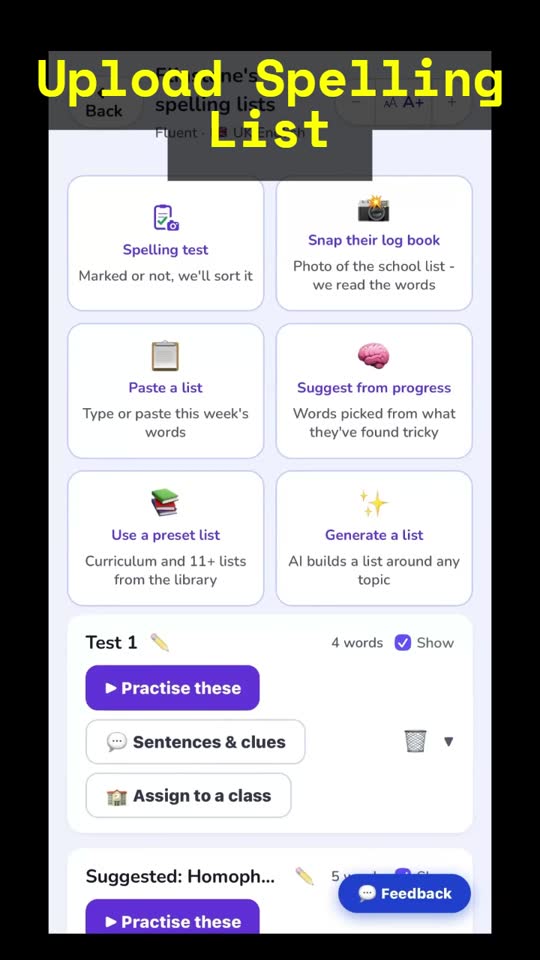
- 📸 Get the words in. Snap a photo of the school spelling list - or paste or type it. The app reads the words and builds the list, with audio, hints and sentences made for every word.
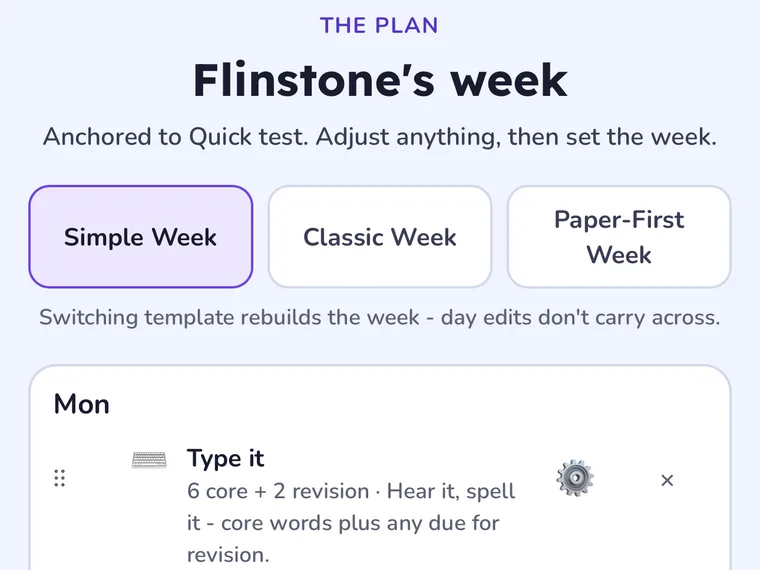
- 🗓️ Follow the weekly plan. A ready-made Learning plan spreads short sessions across the week - handwrite it, type it, or say it aloud, plus spelling games - and every day is editable.
- 🎧 Bring the paper back. Photograph a marked test with Paper practice, or run a Dictation test - results are read and marked automatically.
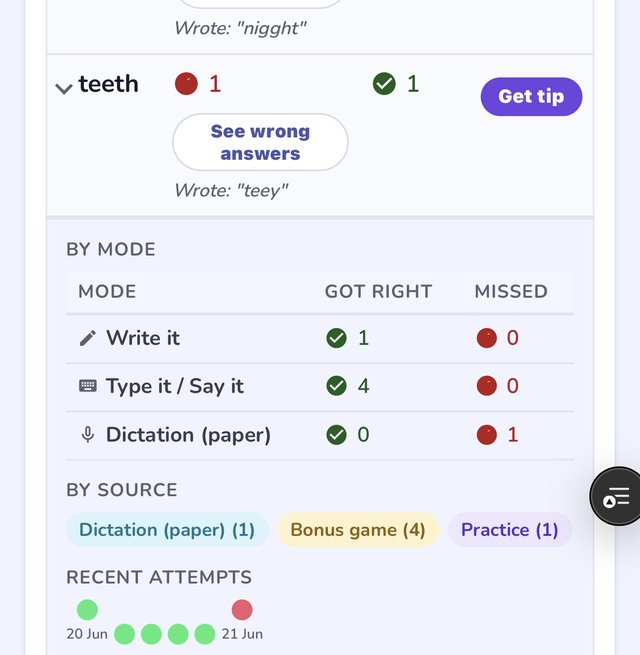
- 📊 See progress and patterns. Tricky words come back first, and every mistake is sorted into the spelling pattern behind it.
🔍 Every mistake is diagnosed, not just marked
A wrong answer isn't just logged as wrong - the classifier matches it to the reason behind it, across four kinds of mistake:
- Sound (phonological). Confused graphemes that share a sound - "ph" written as "f", the schwa vowel that hides which letter it really is, silent letters dropped because you can't hear them.
- Look (visual). A letter swapped for its mirror image or look-alike - b/d, p/q, m/w, n/u - a different cause from a sound mix-up, and diagnosed separately from one.
- Structure (morphological). Prefixes, suffixes and word families - the y that changes to an i before "-ful", the root that stays the same across "sign"/"signature".
- Rule (spelling rules). Doubled letters, short-vs-long vowel doubling, homophones, apostrophes - the rules English spelling actually runs on.
Every one of these feeds straight into what your child practises next and what the AI coach explains - a diagnosis that goes somewhere, not just a label on a wrong answer. Read about the spelling pattern report →
🏅 What "secure" means, and how they get there
Getting a word right once, with the spelling on screen a moment earlier, is not the same as knowing it. So each spelling rule your child meets sits on a three-step scale, and only one kind of evidence moves it to the top:
- Started. They have met the rule, but there is not enough yet to say anything useful about it.
- Nearly there. They are getting it right in practice - typing it, saying it, picking it out - across more than one word, recently, with no slip on that rule.
- Secure. They have written it correctly from memory, with no help, across three different words and on two different days. Different words, because one word written three times is repetition and three words is transfer. On paper or on screen - both count.
It is a run, not a lifetime tally: what counts is the stretch since the last slip, so seven right scattered among wrongs is not secure and three right, recently, is. And it is always a claim about the rule, never about one word - "they're getting the -tion ending right", never "they can spell attention".
From a spelling rule to "Secure" - the whole loop
- 1 · The rule A pattern worth naming "The -tion ending". One of 69 rules the app can spot in a mistake, 53 tied to a National Curriculum statement.
- 2 · The words A list that remembers why Words that test the rule, saved as an ordinary list that knows what it is aimed at.
- 3 · The week A week that can prove it Those words first, and at least one day of real writing - because only writing proves it.
- 4 · The evidence Every attempt, stamped How it was produced: typed or written, from memory or with help.
- 5 · The standing Recomputed overnight Every attempt on the rule replayed to answer one question: right now?
Secure also needs the most recent right answer within 3 weeks, no slip on that rule for 6 weeks, and at least 3 weeks of using the app, so "now" has a "before" to compare with.
Your child's plan uses this. When a week is aimed at a rule, it puts that rule's words first and makes sure at least one day asks them to write - because a week of typing can never show the thing the Friday test asks for. If the national curriculum is not the right yardstick for your family, one setting turns that framing off and keeps the whole scale.
🔁 How words come back (spaced repetition)
Every word your child practises has its own schedule. A word they know comes back less and less often; a word they slip on comes back tomorrow. The schedule moves on what they actually did with the word, not on how long ago the list was set.
- Right first time, with no help. The word comes back after 1 day, then 3 days, then a gap that keeps stretching - roughly 1, 3, 8, then 21 days for a typical word, and longer after that. Each confident right answer also makes the next gap stretch a little further.
- Wrong. The word comes back in 24 hours, the run of right answers starts again, and its gaps grow a little more slowly from then on - so a word that has slipped is checked more often until it settles.
- Right in the end, after missing it first. If your child got it wrong, then right on a retry or with help that arrived after the mistake, it counts as practice rather than proof they remember it. The word comes back in 24 hours, the run is not moved forward, and nothing is held against it.
- Help switched on from the start (a picture, a flash of the word, letter tiles set for your child) does not change the schedule: a right answer with that help counts as a right answer.
What moves a word's schedule:
| Counts | Pick it, Type it, Write it and Say it practice; the Skills Check; dictation and paper tests; paper practice; a teacher's class test; the three-week checkpoint; and the child's own list words in Word Parts and Sound Parts. |
|---|---|
| Doesn't count | Games, Word Meanings, Sentence Builder and Look, hear & remember. Those are play or exposure, not a spelling from memory, so they never push a word's next visit further away. |
How due words reach a practice session:
- In free practice, due words go first - the hardest and most overdue at the front - and the rest of the list is weighted towards words they have missed before. A word not practised for three weeks or more is treated as due again when its list comes up.
- In a weekly plan, practice days also bring back up to four due words from earlier lists, so a word from three weeks ago returns even after the list has moved on. That happens with the Weekly and Fluid rhythms; Classic has no plan, so it relies on the ordering above.
- Each age band keeps its own schedule, so a word practised in the early band and again in the fluent band is tracked separately in each.
The settings that change it:
| Practice rhythm | Weekly and Fluid follow a plan, so due words from earlier lists are added on practice days. Classic has no plan: due words are still put first, but only from the list your child is practising. Change it on the child's Learning plan page. |
|---|---|
| Which week | The everyday weeks bring due words back on their practice days. The Paper-First week is built around paper sessions and adds none, so pair it with some on-screen practice if older words matter. |
| Doesn't change the timing | School year, working towards / at / above, the practice goal, the help style and how strictly handwriting is read. Those shape what your child practises and how; the gaps between visits come only from their answers. |
Spaced repetition only ever asks about words your child has already practised. The three-week checkpoint asks the other question: can they spell new words that use the same patterns?
🌱 Building confidence (ages 5-7)
For children still gaining fluency, the week starts gently and ends on a high:
- Add the words. Paste, type, or snap a photo of the school sheet. Pronunciation audio, memory images, phonics sounds and hints are generated for every word - nothing else to set up.
- Warm up - no pressure to spell yet. Your child meets each word first: Pick it and Trace it build recognition and letter shapes, so writing from memory feels safe when it comes.
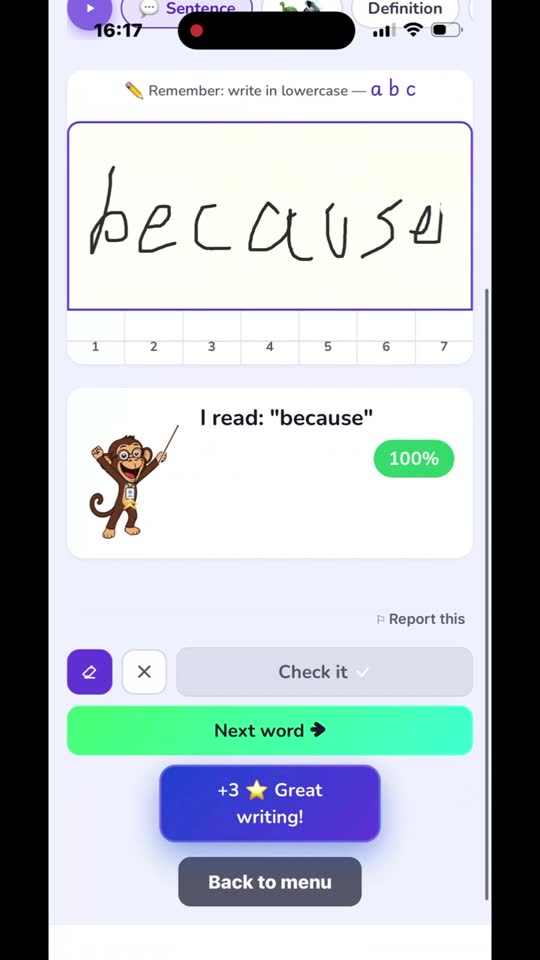
- Now the real thing - on paper. The app reads each word aloud, your child writes it by hand, then you snap the sheet and it's marked in seconds - spelling and letter formation both.
- Finish with the games they've earned. Balloon Pop, Word Builder and friends turn their own tricky words into play - the reward that brings them back next week. Pop the right balloon and that word's picture hint falls down the screen with the coins - the same memory image from practice, reappearing right when they got it right.
Every early-years picture hint is generated by AI for that exact word - and shared: once any family reaches a word, every family and class gets that picture instantly from then on, at no extra cost. If the AI's first guess is wrong for what you meant, describe it yourself from the word list editor and regenerate. Read how the picture hints are made →
🚀 Reading fluently (ages 9-11)
For confident spellers the routine starts with the test school already did:
- Capture the school test. Snap the marked spelling test - Spelling.Live reads the handwriting, marks every word, and pulls the results straight in.
- See why - not just which word. Mistakes are grouped by rule: the schwa they keep dropping, the y-to-i they miss. The exact thing to teach, named for you.
- Drill the rule. The words behind a weak pattern become the practice set - written, typed, said aloud - not a random list.
- Prove it stuck. A quick paper dictation of just the misses; anything still shaky quietly comes back next round.
- Reward and coach. Games drill the same hard words for fun, and the AI coach explains a stubborn pattern - pronunciation, memory hook, word breakdown.
Every practice mode can be switched on or off per child, hints like the Flash word reveal can be allowed or turned off mode by mode, marking can be made gentler, and a parent lock keeps settings safe - as gentle or as stretching as your child needs.
🪜 When they're stuck, help arrives one step at a time
A wrong answer in practice is a teaching moment, not a dead end. Instead of revealing the answer, the aid ladder brings help in steps - and your child retries the same word after every one:
- A clean first try, always. Every word starts unaided - the honest measure of what they can do, untouched by anything that follows.
- Then the first help. Either the word flashes briefly - look, cover, write - or, in Coach it style, Tongo the mascot speaks up with a tip about the exact mistake they just made (the named rule behind it, from the same classifier as the Patterns report) and they try again from memory. The word is never shown in Coach it.
-
Then just the tricky letters. Still wrong? The app compares their answer to the word and
reveals only the letters they slipped on -
_ _ _ i e _ _for a child who wrote "acheive" - never more than half the word. - Then almost all the way - or a kind exit. The heaviest help fills in half the word (or shows it to copy in Write it), and a quiet Skip appears: "Tricky one - we'll come back to it another day." The word returns via spaced repetition. Nobody gets trapped.
You choose the style and pace per child ("Help when stuck" in settings), and per activity in the Learning plan - flash-led on Monday when words are new, coach-led by Thursday. Tests never use the ladder, and a word spelled right after help is recorded as correct with help, so the progress report never flatters. Read how the aid ladder works →
🧩 Knowing a word, not just spelling it
Three activities go beyond drilling letters, because words stick when children understand what they're made of and what they mean:
- Sound Parts - sound boxes for early years. Before letters comes sounds: "ship" is four letters but three sounds, sh-i-p. The app says a word from your child's own list and they tap letter tiles into sound boxes, one box per sound. Each tile says its sound when tapped ("sh", never "ess aitch"), and letters that make one sound share one tile. A wrong try keeps the boxes that were right, and the finished word is read back sound by sound. Every split is worked out from how the word is actually said in UK English, never guessed, and the activity counts towards the progress report as practice with help. Read about Sound Parts →
- Word Parts - long words by their pieces. "Disappointment" is fourteen letters, or three small pieces: dis + appoint + ment. Your child builds the week's words from their parts, then finds the letter that changes where the pieces join - fancy + ful runs together as "fancyful", they tap the y, it becomes an i, and the rule gets named. Every word split is hand-checked, never AI-guessed, and because assembling their own words really is spelling, Word Parts counts towards the progress report. Read about Word Parts →
- Word Meanings - the vocabulary half. Each of this week's words is matched to its meaning, then dropped into its own sentence with the word missing. The wrong answers are the other words on the list - the real confusions - and at higher levels include genuine forms like achieved/achieving, where only the sentence's grammar decides. It never touches the spelling accuracy score, because tapping a meaning isn't spelling - the report stays honest. Read about Word Meanings →
All three are 1 credit a word - half what Pick it, Type it, Write it and Say it cost - and schedulable in the Learning plan. Sound Parts is the early-years Learn More tile; Word Parts and Word Meanings are for both age bands: meanings early in the week, parts midweek, so by Friday the words being tested are words your child actually knows.
🏫 For teachers & tutors
Spelling.Live also runs whole classes: create pupil logins in bulk with printable login labels, assign spelling lists with due dates and notes, use Bulk scan marking to test the whole class on paper with QR-coded sheets and one-batch AI marking, and see class-level progress and trickiest words - one list assigned to 30 pupils generates its audio and images once, not per child. Read the full Teachers & Classes guide →
Prefer the app? Download it free on the Apple App Store or Google Play.
Want the detail? Read the full guide in the Help Centre.